

MessageExport has the ability to apply an export profile to Outlook emails in a selected folder on a scheduled interval. This function could, for example, be used to export emails from the Outlook Inbox every 60 minutes.
First, you would select the export profile (such as Export to PDF) that you want to run on a timed basis, and the click the Edit Selected Profile button to schedule it.
To do this, click on the Scheduler Tab.
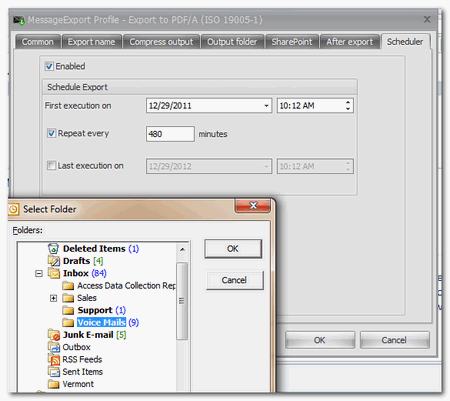
Click the "Enabled" button to activate the timer. A folder menu will appear; select the folder you where the emails are that you want processed.
Set the time when you want MessageExport to perform its first operation, and then the "Repeat" time interval. If you want MessageExport to apply this profile to the selected profile every hour, then enter 60 in the Repeat field.
You can also set a time when MessageExport should halt processing. If you want processing to occur indefinitely then do not put a check in the "Last Execution" field.


© 2005, Encryptomatic LLC. Fargo, ND, USA.