
The Outlook Viewer. Manage email in .msg, .eml, .pst and .ost files.
Requires Microsoft Windows 10/8/7. MsgViewer Pro is now known as PstViewer Pro.

If evaluating for a Site License
please contact the Sales Team at
+1-701-566-6731 x1, or email:
sales at encryptomatic.com
Get a custom quote
Related Product: MsgViewer Lite
Since 2006, MsgViewer Pro by Encryptomatic LLC has been helping people manage their .msg formatted email content. Over the years, new capabilities have added to MsgViewer Pro based on customer requests. In addition to .msg files, you can also open email formatted as .eml and .mht files, as well as Outlook .pst and .ost files.
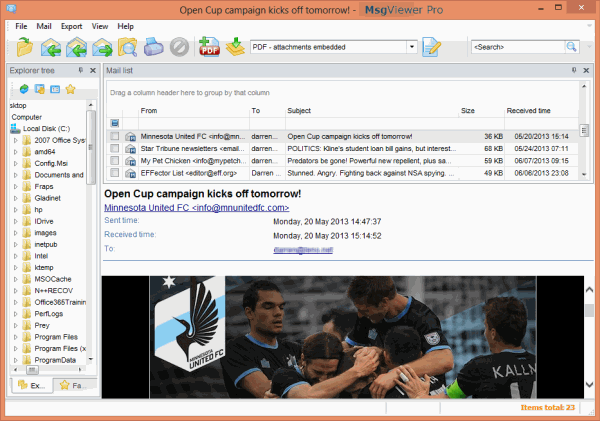
MsgViewer Pro is the most accurate email viewer for .msg files outside of Outlook itself. It can even render text, html, and complex rich text formatted .msg files that have Outlook SmartArt and embeded graphics. You'll appreciate MsgViewer Pro's powerful rendering engine, especially while exporting .msg files to .pdf format.
Convert Outlook .msg files, individually or in bulk, to different formats, including Mbox (Thunderbird), .EML, .MHT, HTML, Text, DOCx, ODT, CSV (Excel), JPG, GIF, TIF, PNG, and PDF. You can also extract file attachments directly from emails and save them a folder.
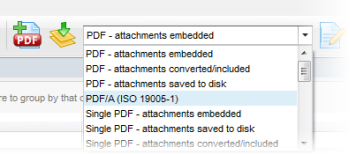
For email archiving, MsgViewer Pro supports PDF/A, an ISO standard approved for long term storage for electronic mail. While exporting email to pdf format, you can choose how MsgViewer Pro should handle your file attachments. Options include extracting them to a disk folder, embedding them within the PDF, or converting many different document types directly to the PDF image. You can export emails to individual pdf files, or covert multiple emails into a single PDF.
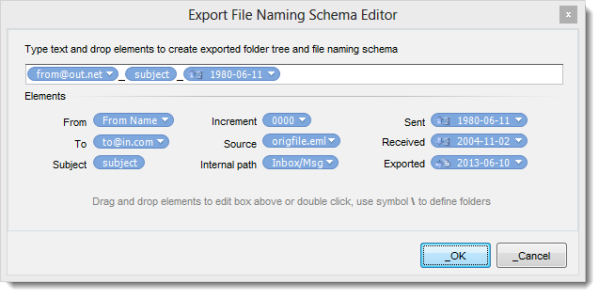
With MsgViewer Pro you can setup and apply a specific file name sequence. Apply file names sequentially with letter and number combinations, or use parts of the emails, such as subject, sender email, receipient, etc. You can even combine different parts to create a custom naming structure.
MsgViewer Pro is well suited to application sharing environments, such as Citrix. Command line options allow system administrators to control the user interface by disabling the features of MsgViewer Pro. For example, if you want your users to be able to browse a directory of .msg files, but not to print or copy, you can disable those features. Learn more about MsgViewer Pro's command line options.
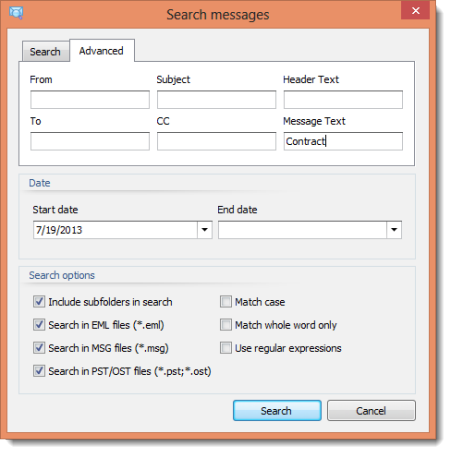
With MsgViewer Pro, you can search your a directory of .msg files, then reply to or forward messages using your favorite desktop email client.
MsgViewer Pro's user interface can be customized by commandline settings, allowing administrators to remove unnecessary product features or menu items.
Click here for the full list of MsgViewer Pro's features.
Please contact our sales department if you have a special request or requirement. For example, if you are interested in licensing this viewer for re-distribution, require a site license, or have a special development need, we would like to discuss it with you. For a prompt response, please email: sales at encryptomatic.com, or phone us: +1-701-566-6731 x1.

MSG Viewer Pro is available for Immediate Download after Purchase


© 2005, Encryptomatic LLC. Fargo, ND, USA.