
Download the Free MessageLock Decryptor
Requirements: Windows 10/8/7/Vista/XP
What is MessageLock Decryptor?
Has someone sent you a file that has the extension .ML256?

To open this file, you will need two things:
MessageLock Decryptor is a free Windows software program that lets you open files that have been encrypted by MessageLock. These files have .ML256 as their file extension, and are protected by 256-bit AES encryption.
MessageLock Decryptor can only decrypt .ml256 files, and it will not encrypt files.
Note to MessageLock Customers
If you have installed MessageLock, then you do not need MessageLock Decryptor on your computer. To encrypt a file so that it is compatible with MessageLock Decryptor, select the "ML256" encryption method in MessageLock's "Manage Passwords" page. You may distribute MessageLock Decryptor to others.
How does MessageLock Decryptor Work?
After installing MessageLock Decryptor, just click on a .ML256 file. Windows will pass the file directly to MessageLock Decryptor, and you will be prompted for a password.
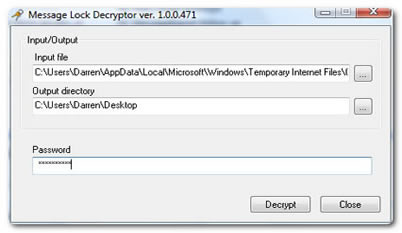
Input File is the path to the file you are opening. If you click on a .ml256 file, this is added automatically.
Output Directory is the location where MessageLock Decryptor will copy the decrypted files. The default is your Windows desktop, however, you can select any location you wish.
For assistance with MessageLock Decryptor, please visit our support ticket site.
Is it Safe?
MessageLock Decryptor does not contain any spyware, adware, nor any tracking or registration mechanism. We do not keep any records of who downloads MessageLock Decrytor. This is a free software package published for the benefit of MessageLock users.
Please follow these guidelines when using MessageLock Decryptor:



© 2005, Encryptomatic LLC. Fargo, ND, USA.